{{ p.description }}
{{ p.feelingNote }}
{{ p.answer }}
Your instructor will give you six characters. The code also travels in the link they send, so a shared link drops you straight onto the right board.
You get a class code to hand out and a private manage key that unlocks moderation. Save the manage key when it appears — it is shown once.
{{ newBoardResult.code }}
{{ newBoardResult.manage_key }}
One Supabase project serves every class board. Create the project, run supabase/schema.sql in its SQL editor, then paste the project URL and the public anon key below. Both are safe to publish — the rules live in the database.
Saved here, the keys live in this browser only. To connect every visitor at once, put the same two values in supabase-config.js before you deploy.
{{ teacherIntro }}
{{ statPosts }}
{{ statFlagged }}
{{ statHidden }}
{{ statCovered }}
Nothing flagged and nothing hidden. The board is clean.
{{ p.answer }}
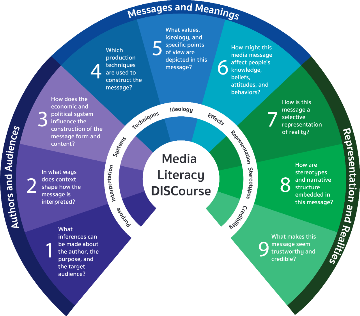
Share your interpretations of the many different kinds of media in your life. Choose an artifact and describe it briefly, then spin the wheel to see what question from the Media Literacy DISCourse Model you must answer. See how critical questions activate critical thinking and discover the new insights that emerge.
{{ form.description }}
{{ biasNote }}
{{ landed.text }}
{{ landed.prompt }}
Every answer is open for anyone to read. Rate what you read and consider how responses to critical questions can change your thoughts and feelings about a media artifact.
{{ p.description }}
{{ p.answer }}
{{ emptyNote }}